












DevOps in Practice for Applications
The OpsAny Digital R&D Platform supports end-to-end CI/CD pipelines and consists of the following platforms:
- Application Platform: an application-centric management platform integrating CMDB, monitoring, and DevOps.
- Code Repository: Git-based repository management with GitLab integration.
- Pipeline: fetches code from the repository and orchestrates CI/CD, with Jenkins integration.
- Artifact Repository: manages artifacts in multiple languages, with Nexus integration.
- Continuous Deployment: custom deployment orchestration, with StackStorm integration.
Build flow
The flow is:
-
- Complete the tool integrations according to the installation documentation.
-
- Create application groups and applications in the 【Application Platform】.
-
- Create a repository in the 【Code Repository】, settle on a sensible branch strategy, and commit code.
-
- Create a continuous integration pipeline in 【Pipeline】: fetch code, run tests, build a deployable artifact, and upload it to the artifact repository.
-
- Create an artifact repository in 【Artifact Repository】 to receive artifacts uploaded by the pipeline.
-
- In 【Continuous Deployment】, fetch the artifact from the artifact repository and deploy it to the target hosts automatically.
There are two dimensions for viewing and operating all of this:
- Platform-centric: separate Code Repository, Pipeline, Artifact Repository, and Continuous Deployment platforms, convenient for the respective administrators to manage their own area.
- Application-centric: the Application Platform already integrates the capabilities of each DevOps platform. Open an application there to manage its repository, pipelines, artifact repository, and continuous deployment.
We recommend granting the Application Platform to developers and testers so they operate on the application dimension day to day. Note that pipelines and continuous deployment integrate with tickets, enabling ticket-driven pipeline runs and automated deployment; the corresponding APIs are already built into the Workbench.
Concepts
Following industry best practices, OpsAny defines the following concepts:
- Application group: a collection of applications, representing a business (e-commerce, social), a product line, or an application suite.
- Application: what we normally mean by an application system — OA, ERP, CRM, OpsAny. Sometimes called a project or platform.
- Service: the substance of an application. An application has at least one service (a monolith); complex applications usually consist of many services — OpsAny itself consists of dozens. Sometimes called a module.
- Process group / workload: a service corresponds to one process or one process group — for example, the multiple processes of Nginx form one Nginx process group. In Kubernetes mode, a process group means a workload.
- Process / container: broadly, a process on the operating system. In Kubernetes mode, a process means a container in a Pod; the container is the smallest unit of management, and processes inside it need not be managed.
Case study: DevOps in practice
This case uses the Bookinfo project from the Istio community to demonstrate the end-to-end flow.
- Gitee: https://gitee.com/unixhot/bookinfo.git
0. About the sample project
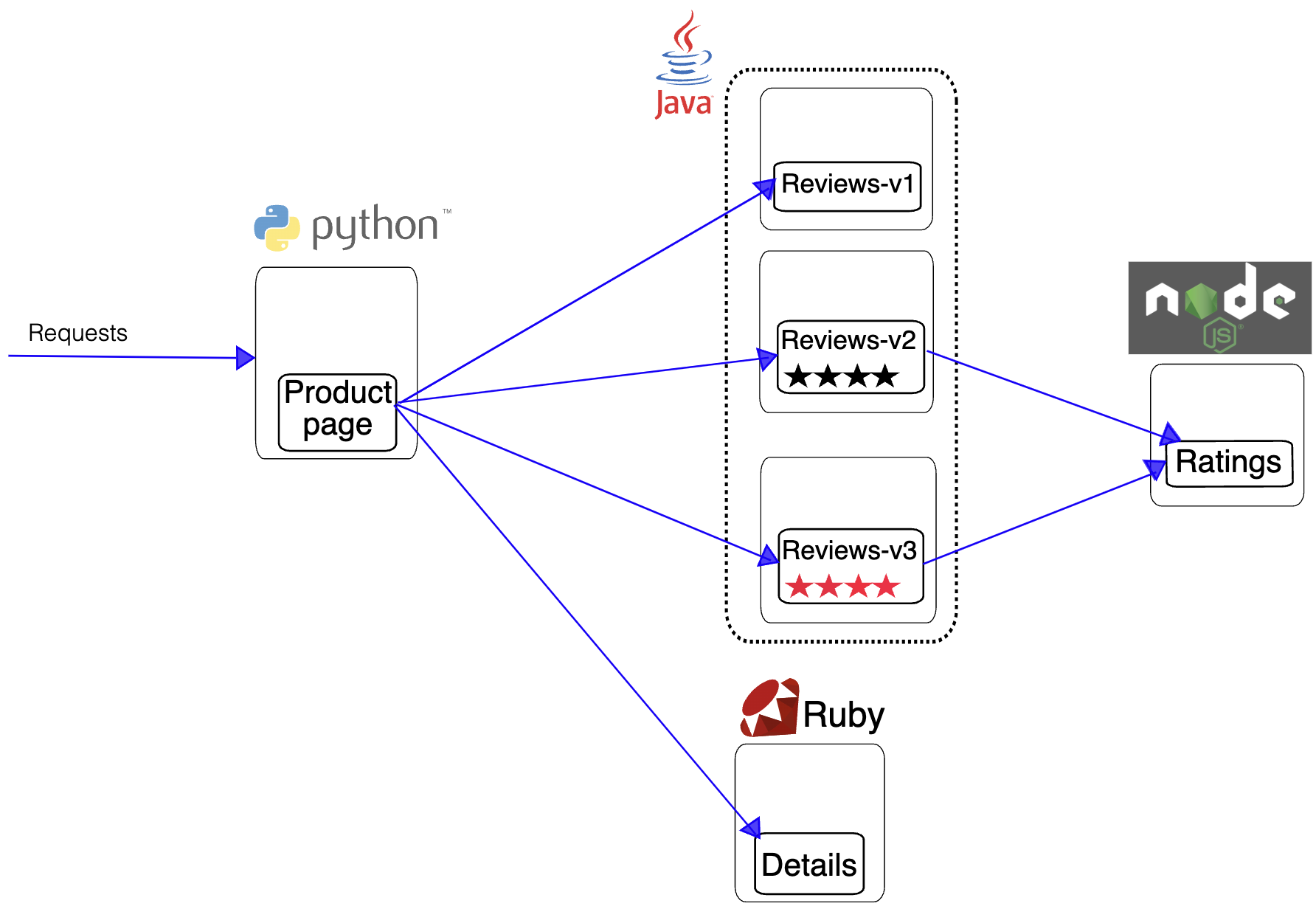
The Bookinfo application mimics a category of an online bookstore, showing information about one book: its description, details (ISBN, page count), and some reviews.
Bookinfo consists of four separate microservices:
- productpage: written in Python; calls the details and reviews microservices to render the page.
- details: written in Ruby; holds book information.
- reviews: written in Java; holds book reviews and calls the ratings microservice.
- ratings: written in NodeJS; holds rating information composed of book reviews.
The reviews microservice has three versions: - v1 does not call the ratings service. - v2 calls the ratings service and shows ratings with 1 to 5 black star icons. - v3 calls the ratings service and shows ratings with 1 to 5 red star icons.
The diagram below shows the application's end-to-end architecture. The project was originally built to demonstrate Istio features, but since it consists of microservices in different languages it also suits DevOps demos.
1. Project management in practice
The OpsAny Digital R&D Platform offers a project model that blends waterfall and agile development.
(To be completed)
2. Code repository in practice
For a development team, the SVN-versus-Git debate is settled: Git is the default choice. What matters is choosing a sensible branch strategy. There is no best branch model — only the one that fits your team. Even different projects or product lines within one department may choose different branch models, though version management and release strategies should be as consistent as possible.
Create the application in the Application Platform first — the repository can then be associated with the application system.
Branch models
Git Flow
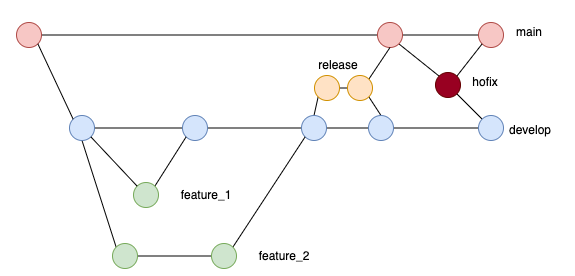
Git Flow is the earliest and most widely adopted workflow, and also a relatively complex branch model. It has the following branches:
-
Master branch (long-lived): the single branch released publicly, and the most stable of all. Only features that have passed strict review and testing and are part of the current release plan are merged into master. When a version is released we usually tag master with the corresponding version number.
-
Develop branch (long-lived): created from master. As an integration branch, it exists specifically to integrate completed features. Develop usually has a more detailed and complete commit history, including fine-grained commits, whereas master — being release-oriented — omits those details and stays lean.
-
Feature branch (short-lived): created from develop. In Git Flow every new feature gets its own feature branch, just as in feature-branch workflows. Besides existing locally, these branches can be pushed to a shared remote repository as a backup and as a basis for collaboration. When the feature is done, the work is merged into develop. Feature branches never interact with master directly.
-
Release branch (short-lived): dedicated to releasing a version. Once enough features are complete, or the planned release cycle approaches, a release branch is created from develop purely for release-related work. After it is cut, no new features may be added — only bug fixes, documentation edits, and similar work.
-
Hotfix branch (short-lived): created from master to carry patch fixes, so a production system gets a fix quickly without disturbing work on other branches. Once done, the hotfix can be merged into master and develop, and into the current release branch. If it changes the version, tag master accordingly.
GitHub Flow
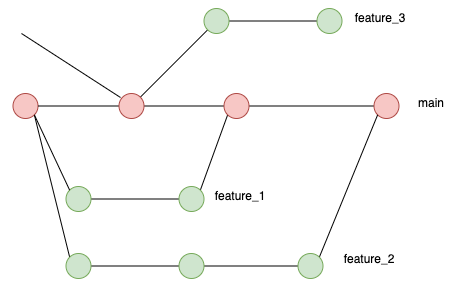
- Master branch (long-lived): create a new branch from master as the project requires, without distinguishing feature branches from patch branches. When the work is done, or when discussion is needed, open a pull request (PR) against master. Once the PR is accepted, it is merged into master.
GitLab Flow
GitLab Flow combines Git Flow and GitHub Flow.
Git Feature flow
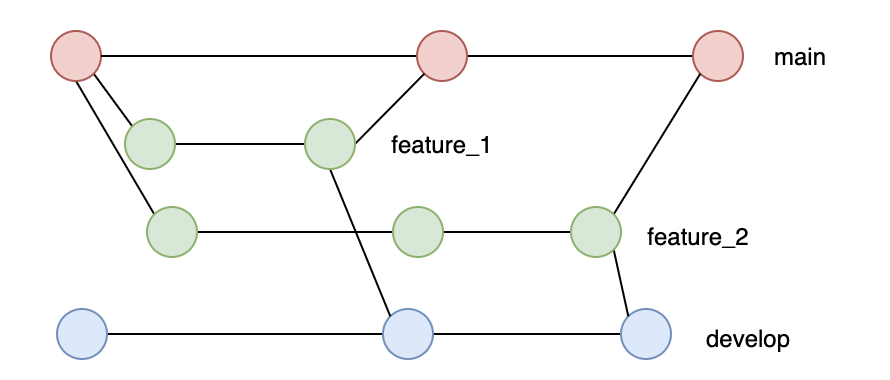
Trunk Based
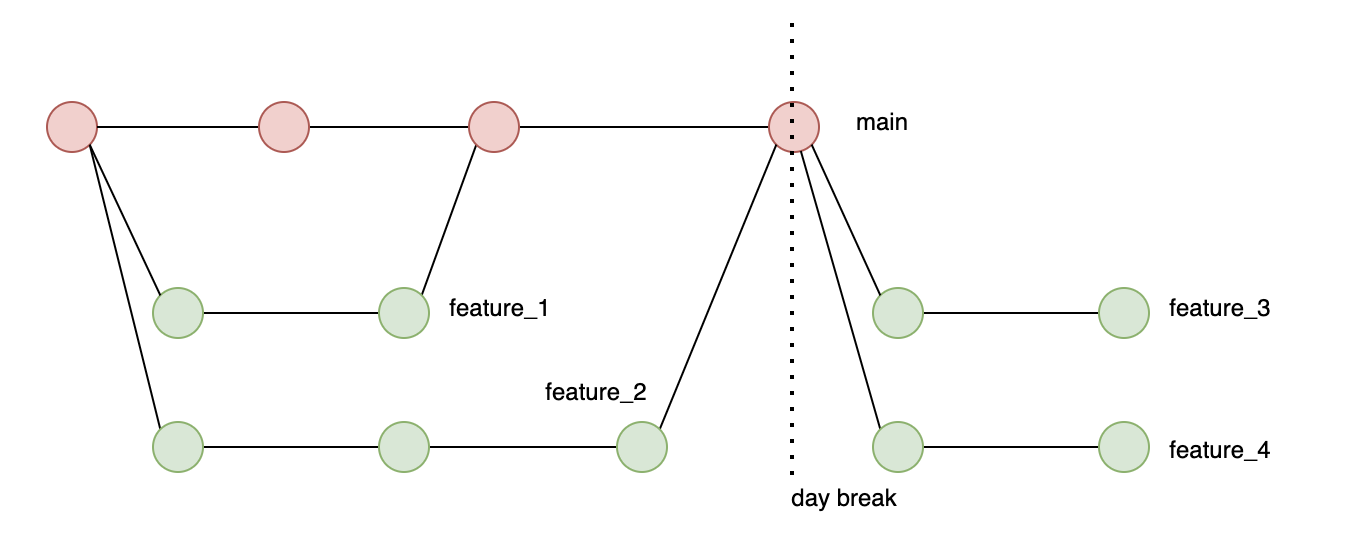
Code version management
3. Pipelines in practice
The Pipeline platform of the OpsAny Digital R&D Platform orchestrates CI/CD. Learning the product's features is not the point — the point is how implementers design pipelines that fit the application and the team. As with branching, there is no "best" pipeline design, only the one that fits your project. Many designs I have seen that violate so-called best practices run perfectly well and deliver real efficiency gains. Still, some principles should be respected; violating them will very likely cause problems:
- Build the artifact once: an artifact produced at the end of a pipeline must be built only once across the whole CI/CD cycle. Never build one package, deploy it to test, then rebuild a new package for production.
- Separate code from configuration: do not package configuration files into the deployment artifact. Manage configuration separately — in files, or in a configuration center such as Nacos, ConfigMap, or Secret.
- Deploy every environment the same way: use the same deployment method or script for all environments — integration test, staging, production. Never use different methods per environment.
- Automate triggers rather than manual runs: take pride in automation and shame in manual steps; release automatically wherever possible.
Create the application in the Application Platform first — a pipeline must belong to an application system.
Pipeline design
Pipeline design is a deep topic that deserves a book chapter. What follows are pipeline designs commonly seen in real OpsAny projects: usually staged, with each application having several pipelines by stage.
- Commit-stage pipeline
- Goal: automatically trigger unit tests, compilation, and quality scanning on every commit, so developers catch code quality problems early.
- Trigger: developers push to the repository's develop branch, which triggers this stage automatically.
-
Steps:
- Pull code
- Compile code
- Unit tests
- Quality scan
-
Integration-test-stage pipeline
- Goal: package and build the code, deploy it automatically to the test environment, and run automated tests to support integration testing.
- Trigger: a merge into the master branch triggers this pipeline automatically.
-
Steps:
- Pull code
- Unit tests
- Build and package
- Upload to the artifact repository
- Deployment approval
- Automated deployment to the test environment
- Automated tests
-
Deployment-stage pipeline
- Goal: deploy the code to the corresponding environment
- Trigger: the user manually selects the environment to deploy
- Steps:
- Automated deployment to the selected environment
- Automated smoke tests
(To be completed)
4. Artifact repository in practice
The Artifact Repository of the OpsAny Digital R&D Platform manages artifacts in multiple languages and is the bridge between CI and CD — especially where CI and CD are separated, for example when an application is developed by a third-party vendor and the whole CI process happens there; integration then starts at the artifact repository. The repository receives artifacts built by the pipeline and artifacts uploaded manually, stores them with version management, and supplies artifacts to continuous deployment.
Artifact sources: - Pipeline builds: war files, Docker images, zip packages, and so on, built by the pipeline and uploaded automatically to the corresponding repository through the pipeline-repository integration. - Manual upload: users upload artifacts by hand, suitable for packages delivered by third-party vendors or for packages that must be moved manually because of network isolation.
Create the application in the Application Platform first — an artifact repository must belong to an application system.
(To be completed)
5. Continuous deployment in practice
Continuous Deployment in the OpsAny Digital R&D Platform is essentially custom orchestration similar to a pipeline, focused on custom orchestration of deployment types.
Create the application in the Application Platform first — a continuous deployment flow must belong to an application system.
(To be completed)