













Developing an Asset Collection Plugin
Asset Collection is the plugin management system in the Control Platform used for asset collection. Once a plugin is finalized, asset collection jobs are managed in the Resource Platform.
An asset collection plugin only has to meet the following requirements:
- The objects to be collected must have their model and attributes (fields) defined in the Resource Platform in advance.
- The fields output by asset collection must map to the unique identifier of the model attribute (field) defined in the Resource Platform.
- Output must be in JSON format.
MySQL Asset Collection Example (Complete Example)
The following uses a MySQL asset collection plugin as an example to show how to develop an asset collection plugin:
- Create a resource model in CMDB
- Create an asset collection plugin in the Control Platform
- Create a collection job in CMDB
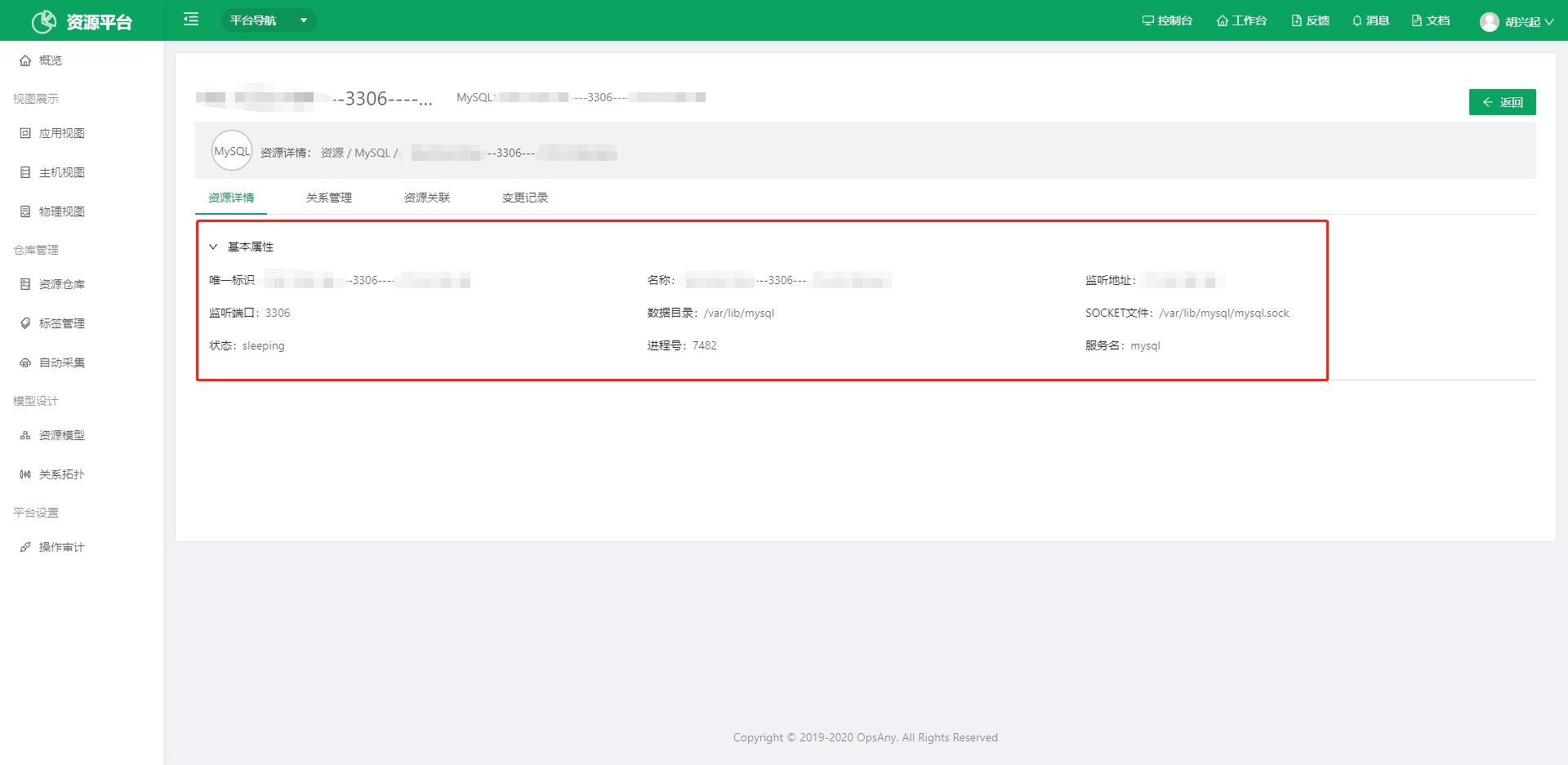
- View collection details
1. Create a Resource Model in CMDB
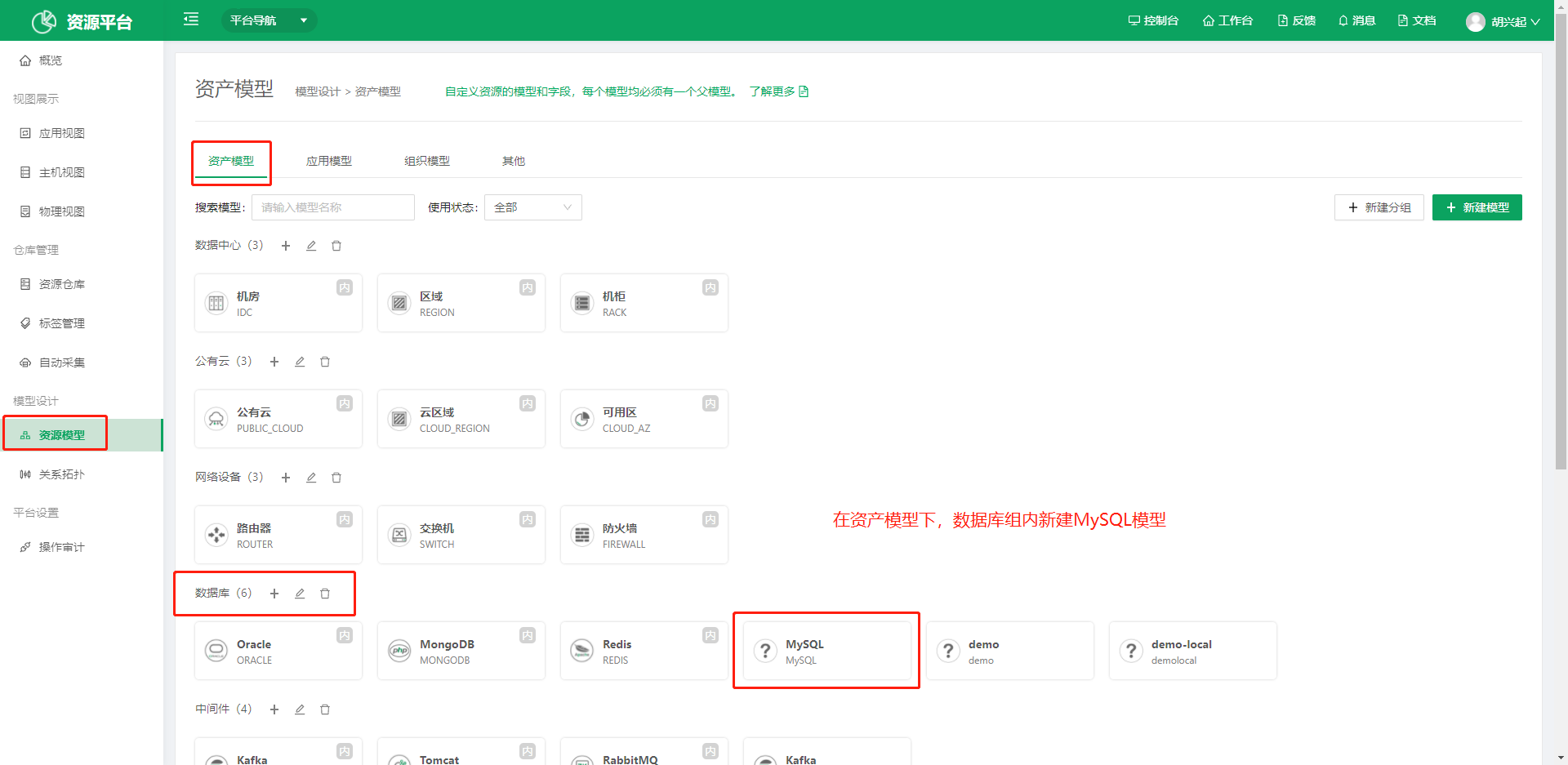
Under Resource Model in CMDB, create an asset model. Note the model group and model name; you will select them by model group and model name when you create the collection script.
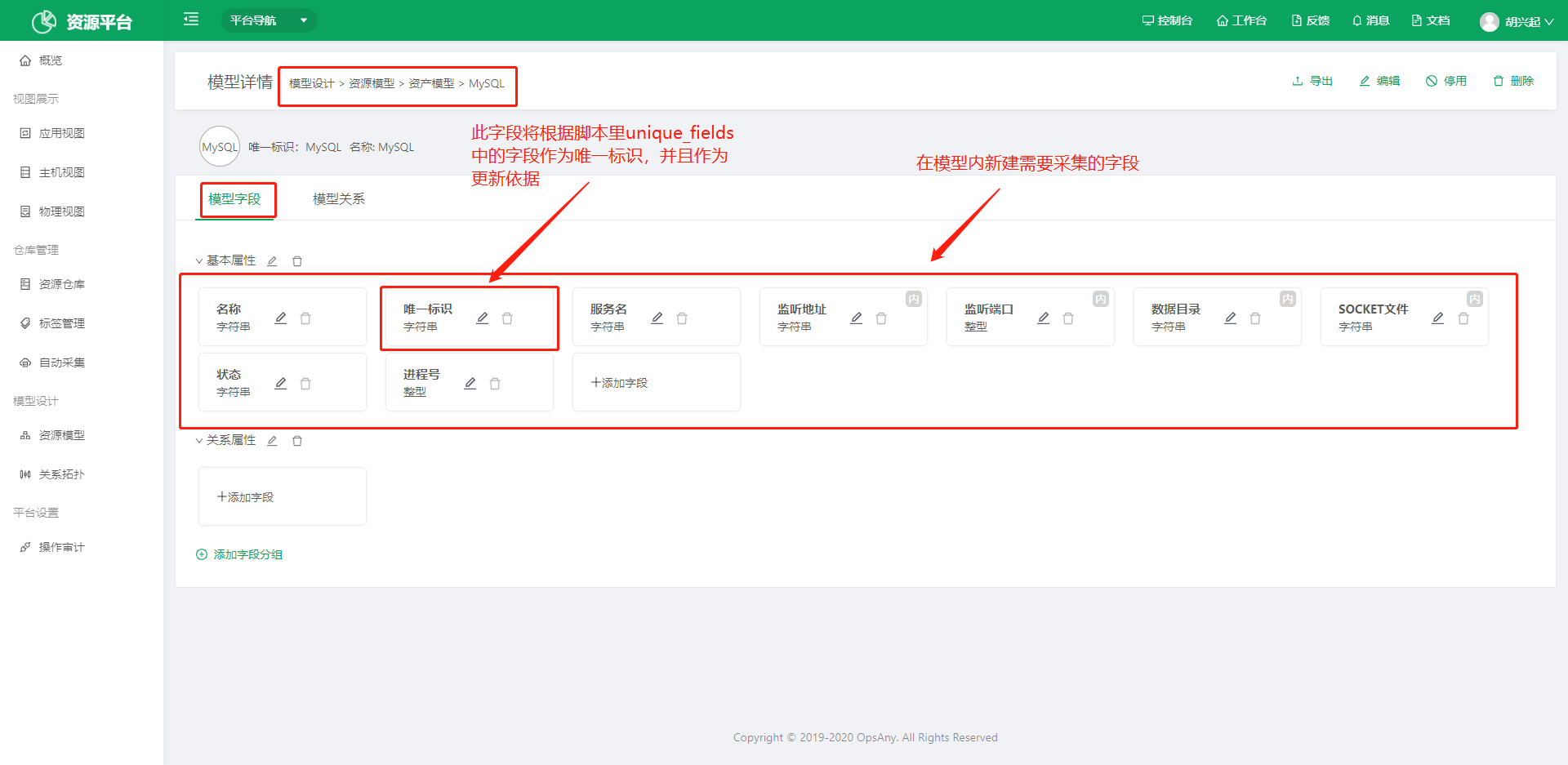
After creating the model, create the fields to be collected inside it. All fields other than the name and the unique identifier are written into the collection script (CMDB_FIELDS) as the script output fields. Note the attribute code of the attributes you need; the collection script uses it.
2. Create an Asset Collection Plugin in the Control Platform
In the Control Platform, create a collection plugin. Specify the category (model group), the collection target (CMDB model), the script content, and so on. Note the plugin name.
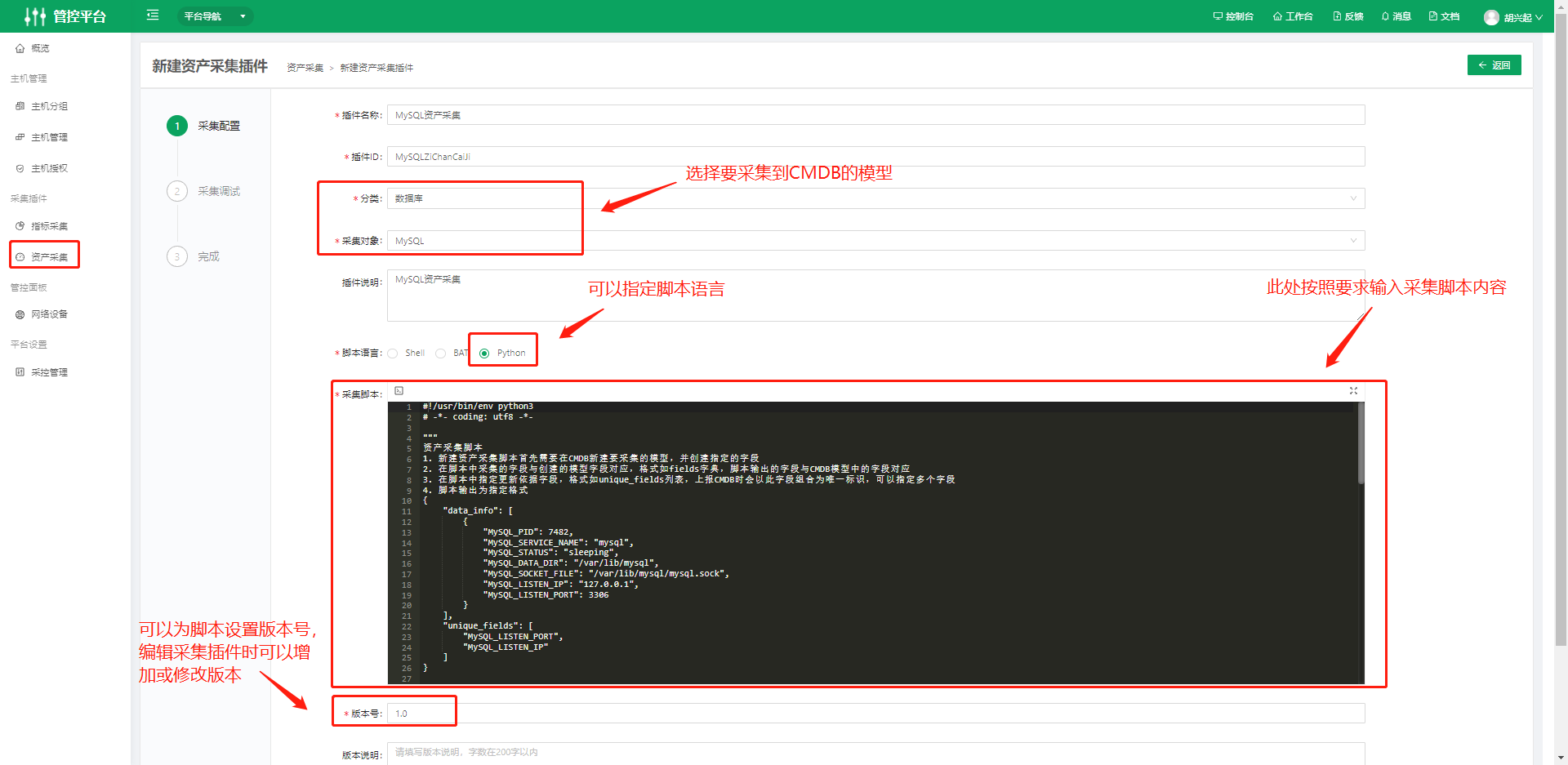
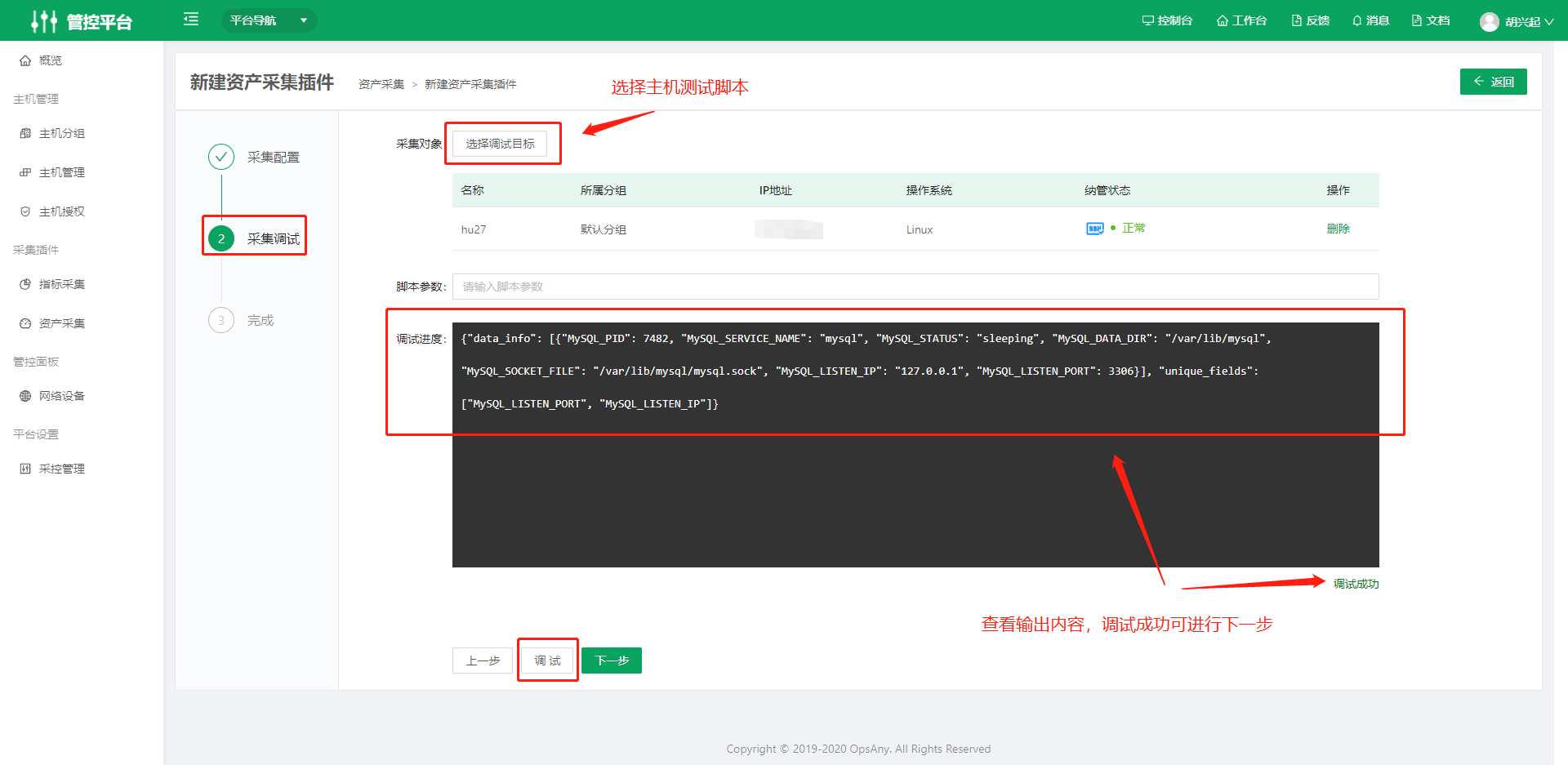
Script content
- CMDB_FIELDS must map the collected fields to the MySQL fields.
- UNIQUE_FIELDS are the fields used as the basis for collection updates. When creating data, they are used as the unique identifier of the CMDB data. Note that you cannot use the two built-in attributes, name and unique identifier.
- The clean_data() function converts the collected data into the fields created in the corresponding CMDB model and outputs it in the required format.
- main() is the entry function.
- get_data_info() is a custom function where you can put the collection steps.
#!/usr/bin/env python3

# -*- coding: utf8 -*-

"""
Asset collection script
1. To create an asset collection script, you first need to create the model to be collected in CMDB and create the specified attributes (fields).
2. The fields collected in the script map to the model attributes you created, in the format of the CMDB_FIELDS dictionary. The fields output by the script map to the attribute fields in the CMDB model.
3. Specify the update basis fields in the script in the format of the UNIQUE_FIELDS list. When reporting to CMDB, their combination is used as the unique identifier. You can specify multiple fields.
4. The script output uses the specified format
{
    "data_info": [
        {
            "MySQL_PID": 7482,
            "MySQL_SERVICE_NAME": "mysql",
            "MySQL_STATUS": "sleeping",
            "MySQL_DATA_DIR": "/var/lib/mysql",
            "MySQL_SOCKET_FILE": "/var/lib/mysql/mysql.sock",
            "MySQL_LISTEN_IP": "127.0.0.1",
            "MySQL_LISTEN_PORT": 3306
        }
    ],
    "unique_fields": [
        "MySQL_LISTEN_PORT",
        "MySQL_LISTEN_IP"
    ]
}

"""

import sys
import json

import psutil

PY3 = sys.version_info[0] > 2

# CMDB field mapping
CMDB_FIELDS = {
    "username": "MySQL_SERVICE_NAME",
    "pid": "MySQL_PID",
    "status": "MySQL_STATUS",
    "datadir": "MySQL_DATA_DIR",
    "socket": "MySQL_SOCKET_FILE",
    "listen_ip": "MySQL_LISTEN_IP",
    "listen_port": "MySQL_LISTEN_PORT",
}

# Update basis fields
UNIQUE_FIELDS = [
    "MySQL_LISTEN_PORT",
    "MySQL_LISTEN_IP"
]

class CollectMySQL:
    def __init__(self):
        self.cmdb_fields = CMDB_FIELDS
        self.unique_fields = UNIQUE_FIELDS

    # Determine the MySQL Pid by the process keywords "mysqld" and "sock"
    def get_pid_of_mysql(self):
        """Return pid of MySQL Instance"""
        mysql_pids = []
        for p in psutil.process_iter(attrs=['name', 'pid']):
            if 'mysqld' == p.info['name']:
                mysql_pids.append(p.pid)
        return mysql_pids

    # Use the MySQL Pid to get the process detail and startup arguments of MySQL
    def get_detail_by_pid(self, pid):
        """Return detail of every pid with defined attributes"""
        try:
            p = psutil.Process(pid)
        except:
            pass
        return p.as_dict(attrs=['name', 'pid', 'username', 'status', 'connections', 'cmdline'])

    def get_data_info(self):
        """input you code"""
        pids = self.get_pid_of_mysql()
        data_info = list()
        if len(pids) > 0:
            for pid in pids:
                mysql_detail = {}
                proc_detail = self.get_detail_by_pid(pid)
                mysql_detail["pid"] = proc_detail['pid']
                mysql_detail["username"] = proc_detail['username']
                mysql_detail["status"] = proc_detail['status']
                for name in proc_detail['cmdline']:
                    if "datadir" in name:
                        mysql_detail["datadir"] = name.split('=')[1]
                    if "sock" in name:
                        mysql_detail["socket"] = name.split('=')[1]
                for name in proc_detail['connections']:
                    mysql_detail["listen_ip"] = name.laddr[0]
                    mysql_detail["listen_port"] = name.laddr[1]
                data_info.append(mysql_detail)
        return data_info

    def clean_data(self, data_info):
        """
        Map the raw fields to the CMDB fields and format them into the required output structure
        data_info: [
            {
                "pid": 7482,
                "username": "mysql",
                "status": "sleeping",
                "datadir": "/var/lib/mysql",
                "socket": "/var/lib/mysql/mysql.sock",
                "listen_ip": "127.0.0.1",
                "listen_port": 3306
            }
        ]
        """
        new_data = []
        for data in data_info:
            dic = {self.cmdb_fields.get(k): v for k, v in data.items() if self.cmdb_fields.get(k)}
            new_data.append(dic)
        return {"data_info": new_data, "unique_fields": self.unique_fields}

    # Format the collected data as JSON
    def main(self, args):
        """Trans All data format with JSON"""
        data_info = self.get_data_info()
        clean_data_info = self.clean_data(data_info)
        return json.dumps(clean_data_info)


if __name__ == "__main__":
    sys.stdin.close()
    print(CollectMySQL().main(sys.argv))
#!/bin/bash

# mysql scanner
# count process of mysql
process_count=$(pgrep -f -a "mysqld" | wc -l )
container_count=$(pgrep -f "mysqld" -U 999 | wc -l )

if [ $process_count -ge 1 ];then
if [ $container_count -ge 1 ];then
    mysql_instance="container"
else
    mysql_instance="host"
fi
else
exit 1
fi

username=root
password="123456"
ipaddr=10.0.0.80

sql1='''show VARIABLES WHERE variable_name LIKE "character_set_database"
OR variable_name LIKE "slow_query_log"
OR variable_name LIKE "datadir"
or variable_name LIKE "basedir"
OR variable_name LIKE "version"
or variable_name LIKE "log_bin" '''

sql2='SHOW VARIABLES WHERE variable_name ="default_storage_engine"'

# Size
sql3="select concat(round((sum(data_length)+sum(index_length))/1024/1024,2),'MB') as data from information_schema.tables"

# Database name
sql4="show databases"
base_info=$(mysql -u$username -h$ipaddr -p$password -s -e "${sql1}" 2>/dev/null)

# read or write
sql5='''SHOW VARIABLES WHERE variable_name= "read_only"'''
read_info=$(mysql -u$username -h$ipaddr -p$password -s -e "${sql5}" 2>/dev/null)

sql10='''SHOW VARIABLES WHERE variable_name LIKE "innodb_buffer_pool_size" OR variable_name LIKE "innodb_log_buffer_size" OR variable_name LIKE "innodb_flush_log_at_trx_commit" OR variable_name LIKE "thread_cache_size" OR variable_name LIKE "query_cache_size" OR variable_name LIKE "max_connections"'''

base_info2=$(mysql -u$username -h$ipaddr -p$password -s -e "${sql10}" 2>/dev/null)
charset=`echo $base_info|awk -F ' ' '{print $4}'`
db_version=`echo $base_info|awk -F ' ' '{print $12}'`
db_size=$(mysql -u$username -h$ipaddr -p$password -s -e "${sql3}" 2>/dev/null)
basedir=`echo $base_info|awk -F ' ' '{print $2}'`
datafile_path=`echo $base_info|awk -F ' ' '{print $6}'`
db_name=$(mysql -u$username -h$ipaddr -p$password -s -e "${sql4}" 2>/dev/null)
storage_engine=`echo $(mysql -u$username -h$ipaddr -p$password -s -e "${sql2}" 2>/dev/null)|awk -F ' ' '{print $2}'`
is_binlog=`echo $base_info|awk -F ' ' '{print $8}'`
is_slow_query_log=`echo $base_info|awk -F ' ' '{print $10}'`

innodb_buffer_pool_size=`echo $base_info2|awk -F ' ' '{print $2}'`
innodb_log_buffer_size=`echo $base_info2|awk -F ' ' '{print $6}'`
innodb_flush_log_at_trx_commit=`echo $base_info2|awk -F ' ' '{print $4}'`
thread_cache_size=`echo $base_info2|awk -F ' ' '{print $12}'`
query_cache_size=`echo $base_info2|awk -F ' ' '{print $10}'`
max_connections=`echo $base_info2|awk -F ' ' '{print $8}'`
is_read_only=`echo $read_info|awk -F ' ' '{print $2}'`


db_names=($db_name)
export db_name_list='"'${db_names[0]}'"'
for i in "${db_names[@]:1}";
do
db_name_list+=,'"'$i'"'
done


ret='''{"'"data_info"'":
        [{
        "'"MySQL_DEPLOY_ENV"'":"'"$mysql_instance"'",
        "'"MySQL_CHART_SET"'":"'"$charset"'",
        "'"MySQL_VERSION"'":"'"$db_version"'",
        "'"MySQL_DB_SIZE"'":"'"$db_size"'",
        "'"MySQL_INSTALL_PATH"'":"'"$basedir"'",
        "'"MySQL_DBFILE_DIR"'":"'"$datafile_path"'",
        "'"MySQL_DB_NAME"'":['"$db_name_list"'],
        "'"MySQL_STORE_ANGINE"'":"'"$storage_engine"'",
        "'"MySQL_ENABLE_BINLOG"'":"'"$is_binlog"'",
        "'"MySQL_ENABLE_SLOWLOG"'":"'"$is_slow_query_log"'",
        "'"MySQL_THREAD_CACHE_SIZE"'":'"$thread_cache_size"',
        "'"MySQL_QUERY_CACHE_SIZE"'":'"$query_cache_size"',
        "'"MySQL_MAX_CONNECTIONS"'":'"$max_connections"',
        "'"MySQL_IS_READONLY"'":"'"$is_read_only"'",
        "'"MySQL_PORT"'":3306,
        "'"MySQL_IP_ADDR"'":"'"$ipaddr"'"
    }],
    "'"unique_fields"'":[
        "'"MySQL_IP_ADDR"'",
        "'"MySQL_PORT"'"]
    }'''


echo "$ret"
3. Create a Collection Job in CMDB
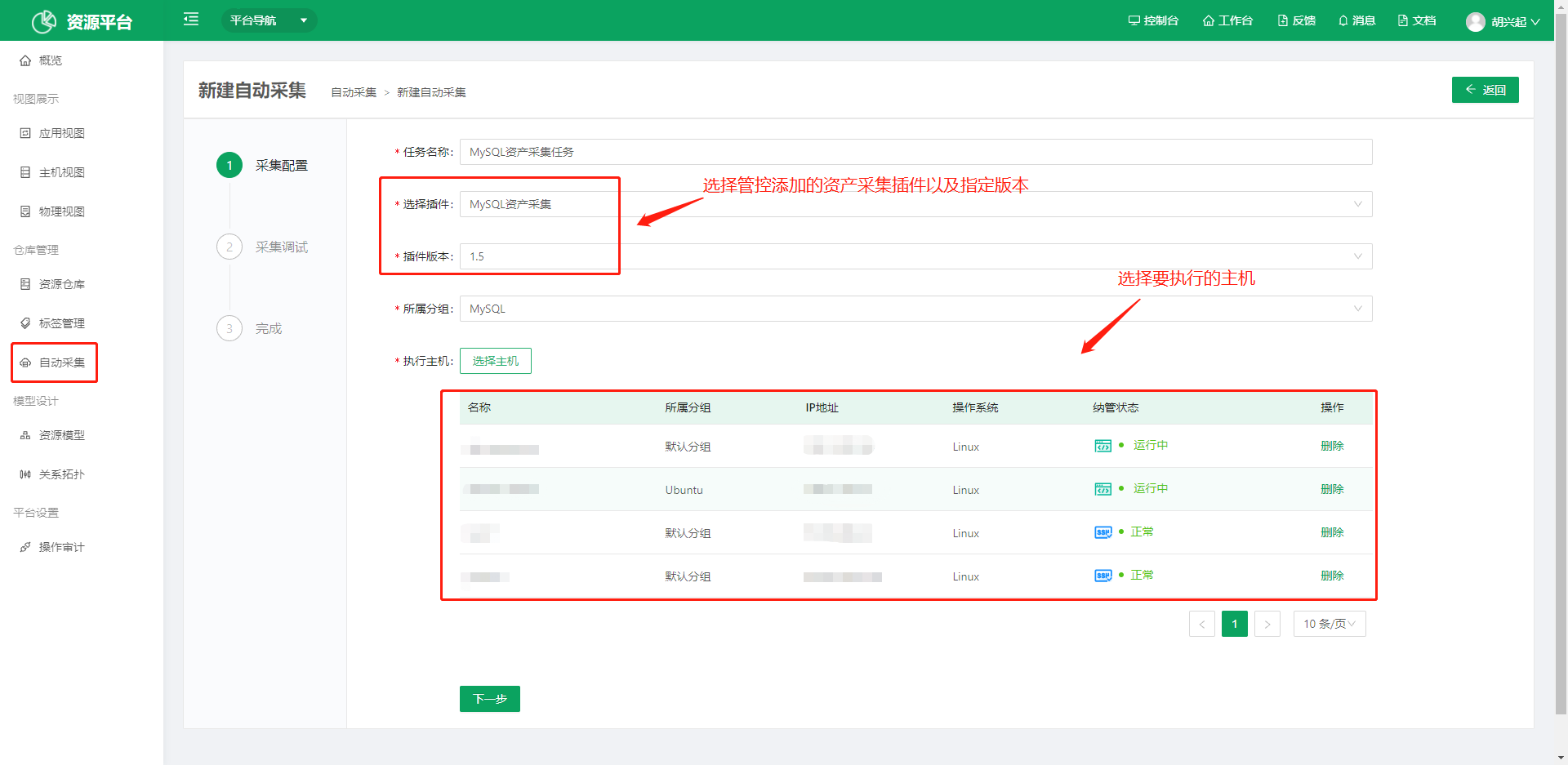
- Create a collection job in CMDB and select the collection plugin and the script version to use.
- Select the hosts to run on. Choose hosts whose onboarding status is normal.
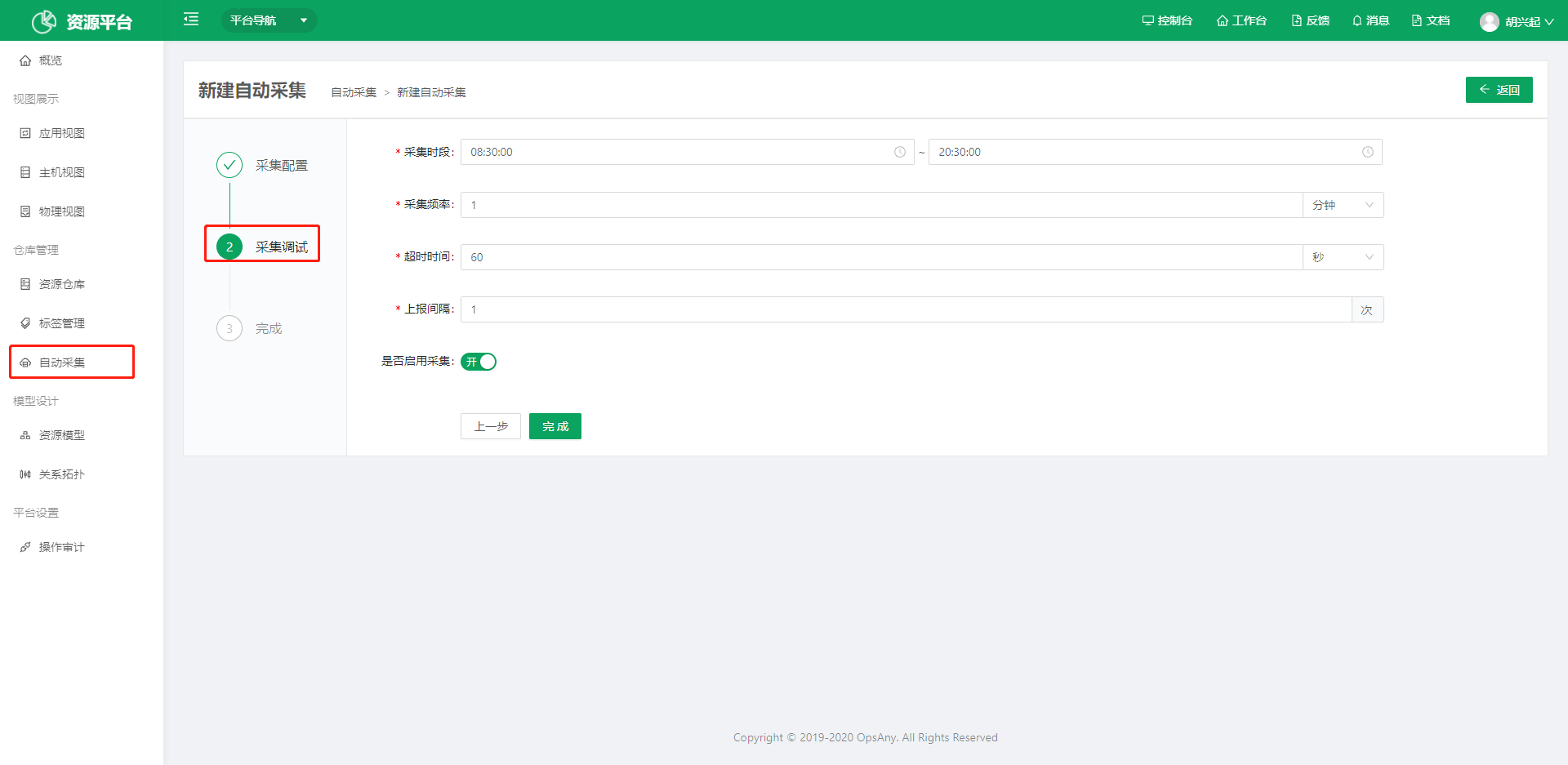
- For the collection window, you can choose a time when the server is idle.
- Collection frequency is how often the script runs to collect data.
- Report interval is how often the collected data is written to the database.
4. View Collection Details
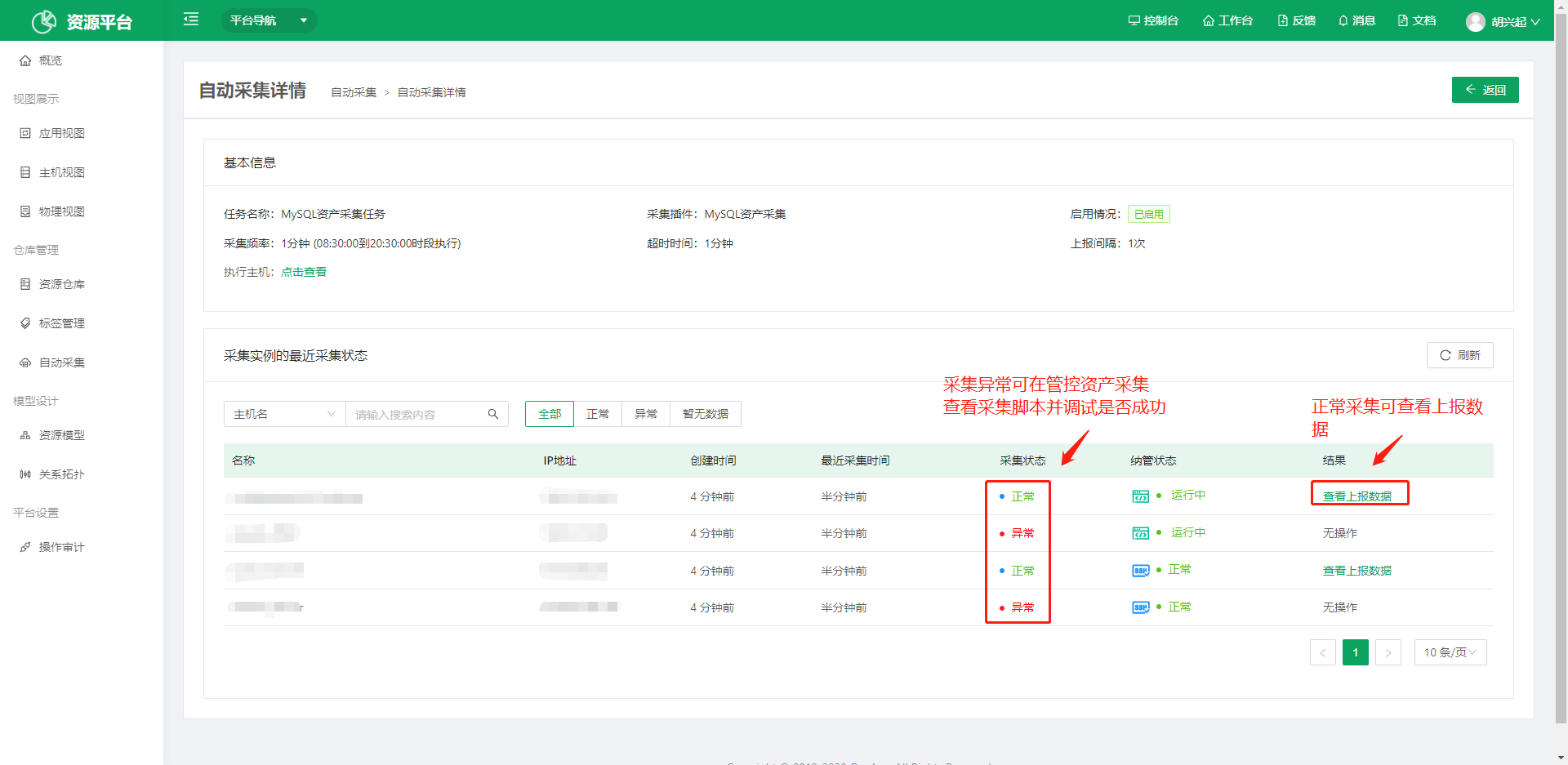
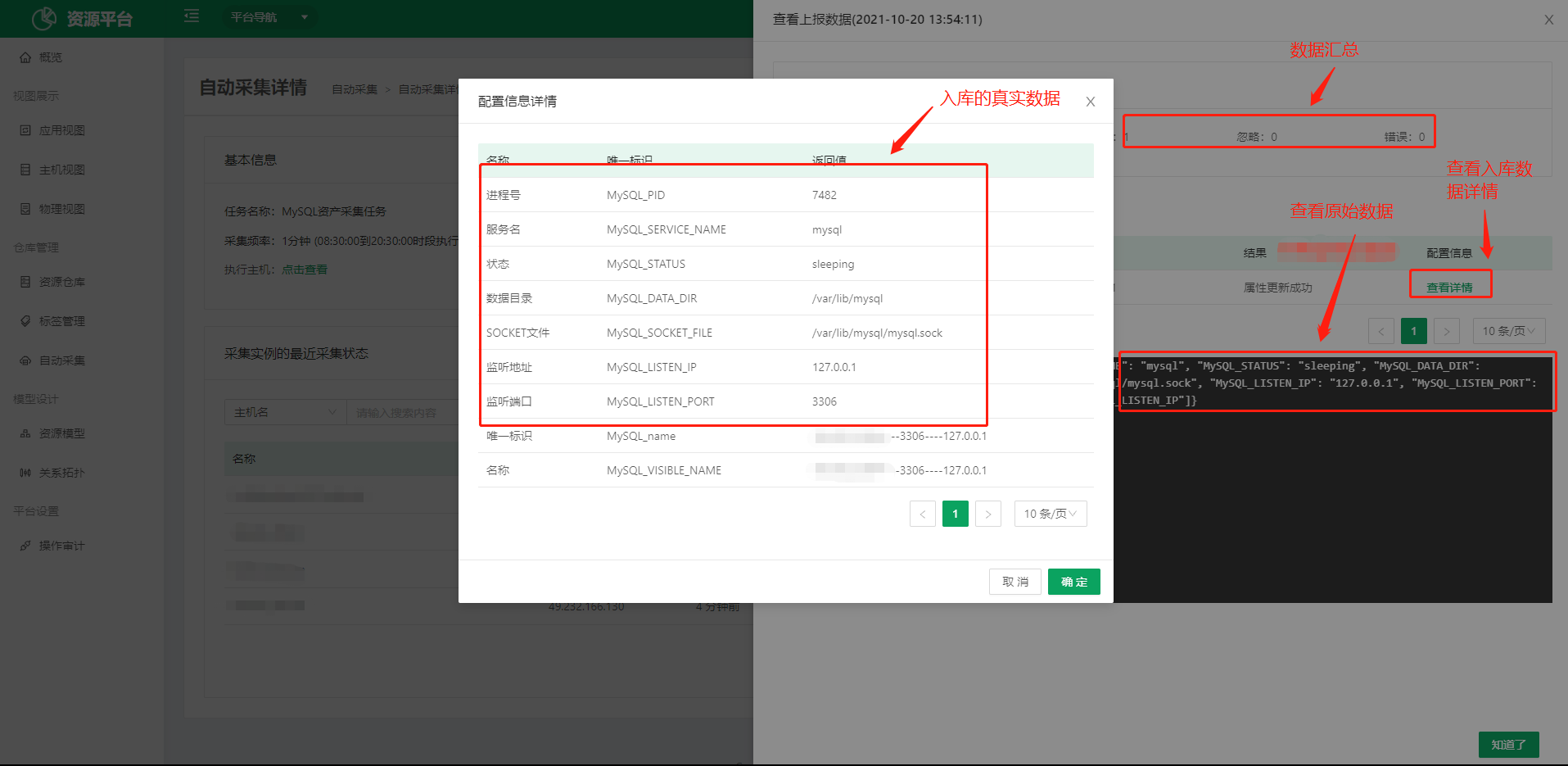
You can view the execution status of the collection script by host and inspect the report details.
MongoDB Asset Collection Example
The following is a classic Shell version of an asset collection plugin. Note the following points:
- If the application is deployed in containers, the PID of the application process and the PID of the process listening on the port may differ, so distinguish between them.
- If the Prometheus Exporter is deployed, note that you must skip the Exporter when filtering by application name, because most of the names are identical.
- If you need a custom name for the collected object, return the field model unique identifier_VISIBLE_NAME, for example MONGODB_VISIBLE_NAME below.
declare -Ain a Shell script declares a variable as an associative array. Because one host may have multiple collected instances, put the data into an array first and then collect in a loop.
Collection Script
#!/bin/bash

# Get all MongoDB process IDs
mongodb_instances(){
    # First check whether MongoDB exists on this host. If it does not exist, return empty and exit the script.
    MONGODB_PIDS=$(ps aux | grep "mongod --auth" | grep -v grep | awk -F ' ' '{print $2}')
    #if [ -z ${MONGODB_PIDS} ];then
    #    exit
    #fi
}

# Write the asset collection function
mongodb_cmdb(){
    INSTALL_DIR=$(ps $MONGODB_PID | awk -F ' ' '{print $5}' | tail -1)
    LISTEN_PORT=$(netstat -ntlp | grep ${MONGODB_PID}/ | awk -F ' ' '{print $4}' | awk -F ':' '{print $2}')
    LISTEN_IP=$(netstat -ntlp | grep ${MONGODB_PID}/ | awk -F ' ' '{print $4}' | awk -F ':' '{print $1}')
    VISIBLE_NAME=${HOSTNAME}_${INSTALL_DIR}
    instance_ret='''
    {
        "'"MONGODB_INSTALL_DIR"'":"'"$INSTALL_DIR"'",
        "'"MONGODB_LISTEN_PORT"'":"'"$LISTEN_PORT"'",
        "'"MONGODB_LISTEN_IP"'":"'"$LISTEN_IP"'",
        "'"MONGODB_VISIBLE_NAME"'":"'"$VISIBLE_NAME"'"
    },
    '''
    echo $instance_ret
}

# Call the collection function in a loop to collect data
main(){
    declare -A MONGODB_INSTENCE_LIST
    mongodb_instances;
    for MONGODB_PID in ${MONGODB_PIDS};do
        MONGODB_INSTENCE=$(mongodb_cmdb)
        MONGODB_INSTENCE_LIST["$MONGODB_PID"]=${MONGODB_INSTENCE}
    done
    ret_dict_tmp=`echo ${MONGODB_INSTENCE_LIST[*]}`
    ret_dict=$(echo ${ret_dict_tmp%?})
    # Assemble the data and output it
    ret='''{"'"data_info"'":
            ['''${ret_dict}'''],
        "'"unique_fields"'":[
            "'"MONGODB_LISTEN_IP"'",
            "'"MONGODB_LISTEN_PORT"'"]
        }'''
    echo $ret

}

main
Host Collection Example
Scenario: the built-in host model does not meet your needs. You need to add fields (attributes) to the cloud host model in the Resource Platform (CMDB), and you also want the data to be collected automatically.
Collection Script
- Write the script. The script must output a JSON.
#!/bin/bash
#******************************************
# Author:       Jason Zhao
# Email:        zhaoshundong@opsany.com
# Organization: OpsAny https://www.opsany.com/
# Description:  Host Asset collection plug-in
#******************************************

# Write the asset collection function
cloud_host_cmdb(){
    CPU_ARCH=$(uname -m)
    MEMORY=$(free -m | grep 'Mem:' | awk -F ' ' '{print $2}')
    KERNEL_RELEASE=$(uname -r)
    OS=$(lsb_release -i | awk -F ' ' '{print $3}')
    CPU_NUM=$(lscpu | grep 'CPU(s):' | awk -F ' ' '{print $2}')
    INTERNAL_IP=$(ifconfig eth0 | grep inet | grep -v inet6 |awk '{print $2}'|tr -d "addr:")
    instance_ret='''
    {
        "'"CLOUD_SERVER_CPU_ARCH"'":"'"$CPU_ARCH"'",
        "'"CLOUD_SERVER_CPU_NUM"'":"'"$CPU_NUM"'",
        "'"CLOUD_SERVER_OS"'":"'"$OS"'",
        "'"CLOUD_SERVER_MEMORY"'":"'"$MEMORY"'",
        "'"CLOUD_SERVER_INTERNAL_IP"'":"'"$INTERNAL_IP"'",
        "'"CLOUD_SERVER_HOSTNAME"'":"'"$HOSTNAME"'",
        "'"CLOUD_SERVER_KERNEL_RELEASE"'":"'"$KERNEL_RELEASE"'",
        "'"CLOUD_SERVER_VISIBLE_NAME"'":"'"$HOSTNAME"'"
    }
    '''
    echo $instance_ret
}

# Main function
main(){
    ret_dict=$(cloud_host_cmdb)
    # Assemble the data as JSON and output it
    ret='''{"'"data_info"'":
            ['''${ret_dict}'''],
        "'"unique_fields"'":[
            "'"CLOUD_SERVER_INTERNAL_IP"'"]
        }'''
    echo $ret

}

main
- Run the script to debug it and check whether the output is correct.
[root@ops-node1 ~]# bash host.sh
- Use Python to verify that the output conforms to the JSON specification.
[root@ops-node1 ~]# bash host.sh | python -c "import sys,json;json.loads(sys.stdin.read());print 'OK'"