













Deploying KubeVirt
About KubeVirt
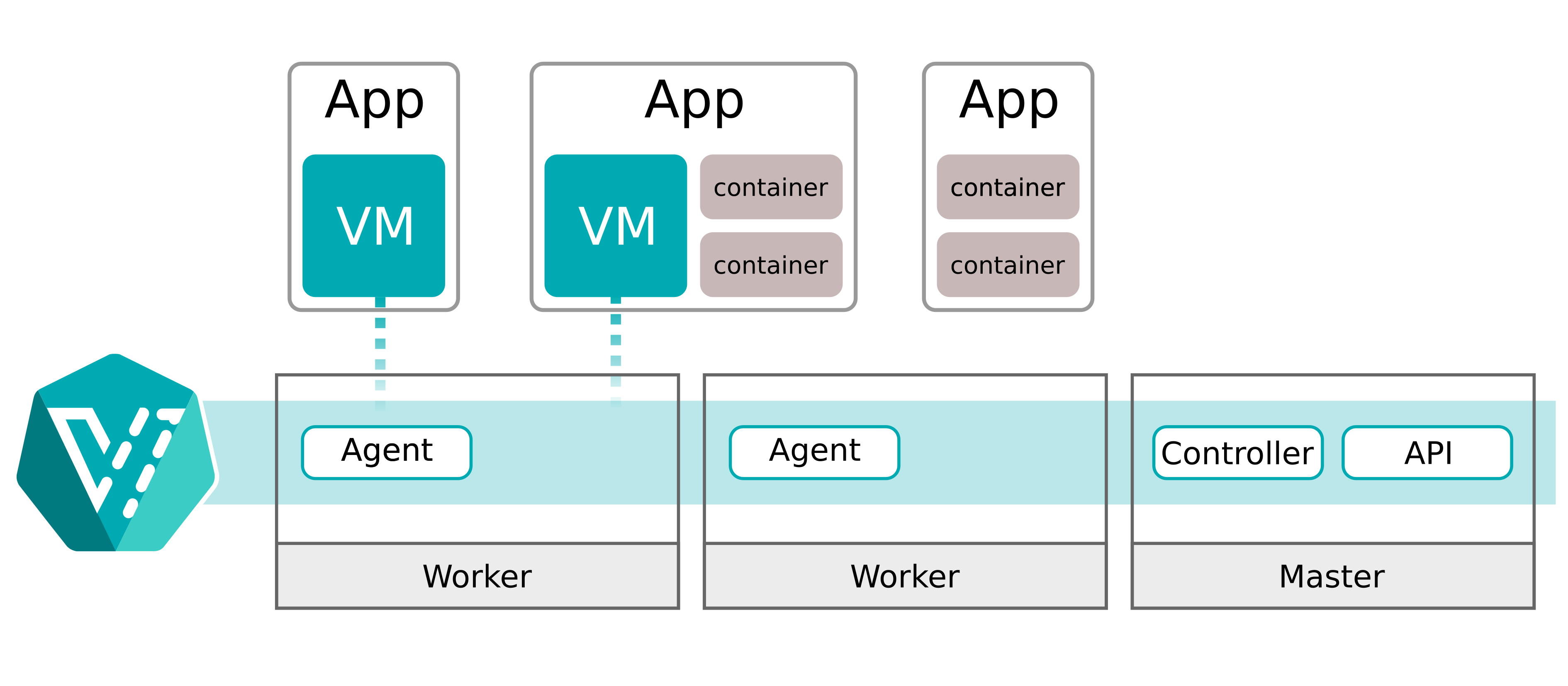
KubeVirt is an open-source project that runs and manages virtual machines in a Kubernetes cluster just like containers, bringing a modern container orchestration platform to traditional VM workloads. Virtual machines are represented by a Custom Resource Definition (CRD) in Kubernetes.
Project: https://github.com/kubevirt/kubevirt
Preparing the base environment
-
- Install the required packages
$ apt install -y libvirt-clients virt-manager bridge-utils
-
- Check whether the node supports virtualization
Physical hosts are recommended for production. In lab environments without hardware virtualization, enable software emulation instead.
$ virt-host-validate qemu
  QEMU: Checking for hardware virtualization                                 : PASS
  QEMU: Checking if device /dev/vhost-net exists                             : PASS
  QEMU: Checking if device /dev/net/tun exists                               : PASS
  QEMU: Checking for cgroup 'cpu' controller support                         : PASS
  QEMU: Checking for cgroup 'cpuacct' controller support                     : PASS
  QEMU: Checking for cgroup 'cpuset' controller support                      : PASS
  QEMU: Checking for cgroup 'memory' controller support                      : PASS
  QEMU: Checking for cgroup 'devices' controller support                     : PASS
  QEMU: Checking for cgroup 'blkio' controller support                       : PASS
  QEMU: Checking for device assignment IOMMU support                         : WARN (Unknown if this platform has IOMMU support)
  QEMU: Checking for secure guest support                                    : WARN (Unknown if this platform has Secure Guest support)
Installing KubeVirt
-
- Install KubeVirt
# Get the latest release
$ export RELEASE=$(curl https://storage.googleapis.com/kubevirt-prow/release/kubevirt/kubevirt/stable.txt)
# Deploy the KubeVirt operator
$ wget https://github.com/kubevirt/kubevirt/releases/download/${RELEASE}/kubevirt-operator.yaml
$ kubectl apply -f kubevirt-operator.yaml

# Create the KubeVirt CR (instance deployment request) which triggers the actual installation
$ wget https://github.com/kubevirt/kubevirt/releases/download/${RELEASE}/kubevirt-cr.yaml
# If hardware virtualization is unavailable, enable software emulation by adding useEmulation: true
$ vim kubevirt-cr.yaml
---
apiVersion: kubevirt.io/v1
kind: KubeVirt
metadata:
  name: kubevirt
  namespace: kubevirt
spec:
  certificateRotateStrategy: {}
  configuration:
    developerConfiguration:
      useEmulation: true
      featureGates: []
  customizeComponents: {}
  imagePullPolicy: IfNotPresent
  workloadUpdateStrategy: {}
$ kubectl apply -f kubevirt-cr.yaml
# wait until all KubeVirt components are up
$ kubectl -n kubevirt wait kv kubevirt --for condition=Available
-
- Check the Pod status
root@kube-node1:~# kubectl get pods -n kubevirt
NAME                               READY   STATUS    RESTARTS   AGE
virt-api-fdbc87c9-rw4m8            1/1     Running   0          9m34s
virt-api-fdbc87c9-tsfvx            1/1     Running   0          9m34s
virt-controller-844699784f-72psc   1/1     Running   0          8m57s
virt-controller-844699784f-zpg44   1/1     Running   0          8m57s
virt-handler-clw89                 1/1     Running   0          8m57s
virt-handler-drbsn                 1/1     Running   0          8m57s
virt-operator-74bdf99686-nlxkk     1/1     Running   0          10m
virt-operator-74bdf99686-wxt5j     1/1     Running   0          10m
-
- Deploy virtctl
Virtual machines can subsequently be managed with either virtctl or kubectl.
$ cd /usr/local/src
$ wget https://github.com/kubevirt/kubevirt/releases/download/v1.3.1/virtctl-v1.3.1-linux-amd64
$ mv virtctl-v1.3.1-linux-amd64 /usr/local/bin/virtctl
$ chmod +x /usr/local/bin/virtctl
$ virtctl version
Client Version: version.Info{GitVersion:"v1.3.1", GitCommit:"ed1e7ae8548d319fa7aacf315ad198f7241287c5", GitTreeState:"clean", BuildDate:"2024-08-22T08:52:25Z", GoVersion:"go1.22.2 X:nocoverageredesign", Compiler:"gc", Platform:"linux/amd64"}
Server Version: version.Info{GitVersion:"v1.3.1", GitCommit:"ed1e7ae8548d319fa7aacf315ad198f7241287c5", GitTreeState:"clean", BuildDate:"2024-08-22T10:09:02Z", GoVersion:"go1.22.2 X:nocoverageredesign", Compiler:"gc", Platform:"linux/amd64"}
Creating a virtual machine
# Example virtual machine manifest
$ vim vm.yaml
apiVersion: kubevirt.io/v1
kind: VirtualMachine
metadata:
  labels:
    kubevirt.io/vm: vm-cirros
  name: vm-cirros
spec:
  running: false
  template:
    metadata:
      labels:
        kubevirt.io/vm: vm-cirros
    spec:
      domain:
        devices:
          disks:
          - disk:
              bus: virtio
            name: containerdisk
          - disk:
              bus: virtio
            name: cloudinitdisk
        machine:
          type: ""
        resources:
          requests:
            memory: 64M
      terminationGracePeriodSeconds: 0
      volumes:
      - name: containerdisk
        containerDisk:
          image: quay.io/kubevirt/cirros-container-disk-demo:latest
      - cloudInitNoCloud:
          userDataBase64: IyEvYmluL3NoCgplY2hvICdwcmludGVkIGZyb20gY2xvdWQtaW5pdCB1c2VyZGF0YScK
        name: cloudinitdisk

# Create the virtual machine
$ kubectl apply -f vm.yaml

# Check the virtual machine status
$ kubectl get vm,vmi,pod

# Start the virtual machine with kubectl
$ kubectl patch virtualmachine vm-cirros --type merge -p '{"spec":{"running":true}}'
Managing virtual machines
Connecting to a virtual machine
- Connect with virtctl console
root@kube-node1:~# virtctl console vm-cirros
Successfully connected to vm-cirros console. The escape sequence is ^]

login as 'cirros' user. default password: 'gocubsgo'. use 'sudo' for root.
vm-cirros login: cirros
Password:
$ uptime
 03:58:23 up 11:56,  1 users,  load average: 0.00, 0.00, 0.00
- Connect with virtctl ssh
The cirros image uses the username cirros and the default password gocubsgo.
root@kube-node1:~# virtctl ssh cirros@vm-cirros
cirros@vmi/vm-cirros.default's password:
$ ifconfig
eth0      Link encap:Ethernet  HWaddr BE:83:10:2A:15:F9
          inet addr:10.2.1.5  Bcast:10.2.1.255  Mask:255.255.255.0
          inet6 addr: fe80::bc83:10ff:fe2a:15f9/64 Scope:Link
          UP BROADCAST RUNNING MULTICAST  MTU:1402  Metric:1
          RX packets:121 errors:0 dropped:0 overruns:0 frame:0
          TX packets:77 errors:0 dropped:0 overruns:0 carrier:0
          collisions:0 txqueuelen:1000
          RX bytes:16439 (16.0 KiB)  TX bytes:8842 (8.6 KiB)

lo        Link encap:Local Loopback
          inet addr:127.0.0.1  Mask:255.0.0.0
          inet6 addr: ::1/128 Scope:Host
          UP LOOPBACK RUNNING  MTU:65536  Metric:1
          RX packets:0 errors:0 dropped:0 overruns:0 frame:0
          TX packets:0 errors:0 dropped:0 overruns:0 carrier:0
          collisions:0 txqueuelen:1
          RX bytes:0 (0.0 B)  TX bytes:0 (0.0 B)
- Connect over SSH
Like a Pod, every virtual machine gets an IP address from the Pod CIDR.
root@kube-node1:~# ssh cirros@10.2.1.5
cirros@10.2.1.5's password:
$ uptime
 04:04:42 up 12:02,  1 users,  load average: 0.00, 0.00, 0.00
- Stop the virtual machine
Stopping a virtual machine deletes its VMI automatically, so the correct order for removing a VM is: stop it first, then delete it.
$ virtctl stop vm-cirros
VM vm-cirros was scheduled to stop
Virtual machine states
- Stopped: the VM is stopped and is not expected to start.
- Provisioning: cluster resources for the VM (such as volumes) are being configured and prepared.
- Starting: the VM is being prepared to run.
- Running: the VM is running.
- Paused: the VM is paused.
- Migrating: the VM is being migrated to another host.
- Stopping: the VM is stopping.
- Terminating: the VM is being deleted, including its related resources (VM instance, volumes, and so on).
- Unknown: the VM state cannot be obtained, usually because of a communication error with the host running it.