













OpsAny Deployment Architecture
OpsAny Deployment Architecture
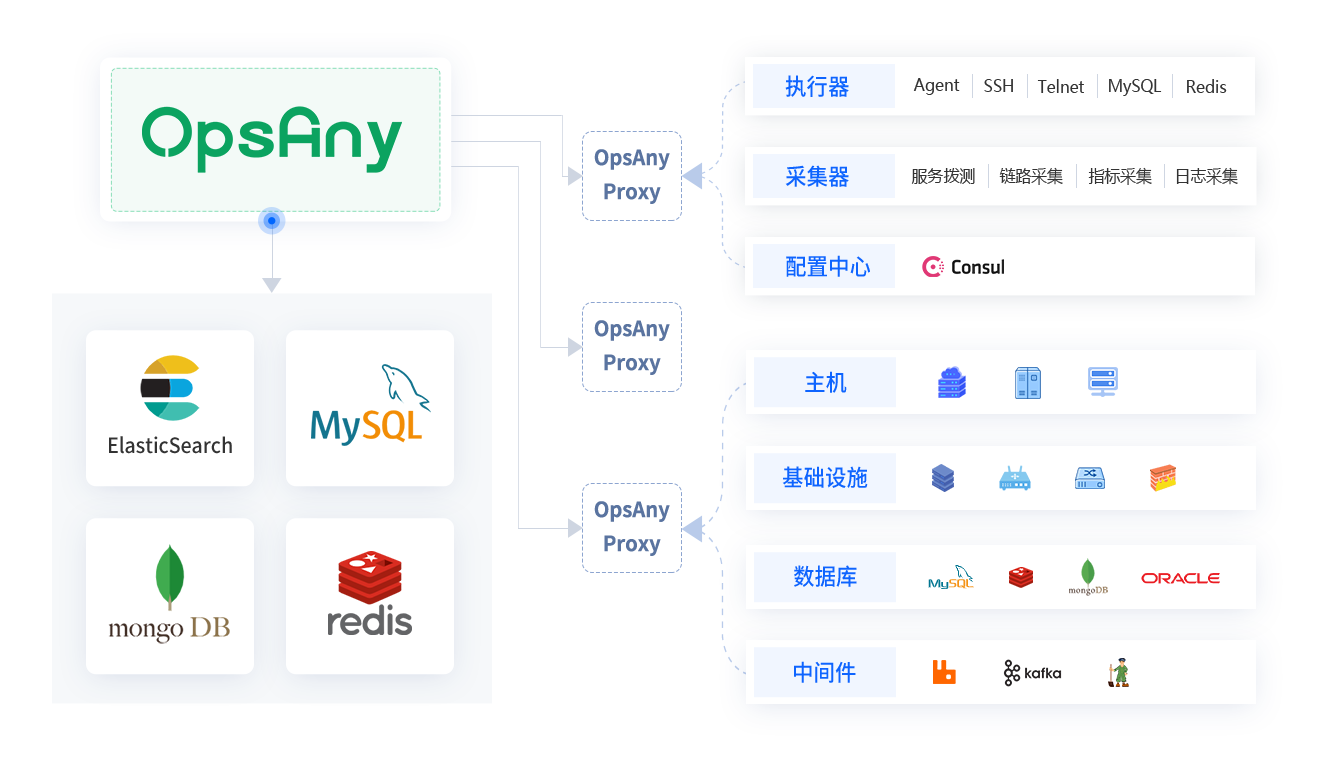
OpsAny as a whole has three parts:
- OpsAny platform: made up of two major parts — the OpsAny PaaS platform and all the SaaS platform applications on top of it.
- OpsAny-Proxy: also made up of two parts — 1. the in-house Proxy plus the integrated Zabbix and Prometheus; 2. other integrated services.
- OpsAny-Agent: an agent process with its own independent Python runtime. It can also integrate zabbix-agent and Node Exporter as plugins.
A default OpsAny deployment automatically deploys one built-in OpsAny Proxy that shares the platform's MySQL and Redis. This suits users in a single network environment with a modest number of hosts. When your services span multiple network environments, or the host count exceeds ten thousand and a single Proxy cannot meet performance requirements, deploy additional OpsAny Proxies yourself.
File transfer in multi-Proxy mode
Many people ask why the Proxy must be able to reach ports 8011 and 8012 on the Server. The answer lies in how files are synchronized in multi-Proxy mode. There are several common approaches:
- File push: the Server pushes files to the Proxy host. (The Server must determine which Proxy owns the target host and push to it; pushes are delayed and must be handled.)
- File sharing: the Server shares files, for example over NFS, and every Proxy mounts the share so it can read files "locally". (Complex to configure, and NFS network policies are complex too.)
- File sync: the Server syncs files to every Proxy, for example with Rsync, so every Proxy reads them locally. (Sync is delayed and must be handled.)
- The OpsAny model: files uploaded by users are stored on the Server; the Server tells the Proxy to download the file from the Server, and the Proxy tells the Agent to download the file from the Proxy. (Simple logic, simple deployment.)
Network constraints of the OpsAny model: The OpsAny model resembles file sharing but is not traditional network sharing. Its biggest constraint is that the Proxy must be able to reach the Server's ports, which does not work in some scenarios. For example, if OpsAny is deployed on a corporate intranet and Proxies are deployed in Alibaba Cloud, Tencent Cloud, and Huawei Cloud while the intranet has no fixed public IP address, file transfer cannot work. If you have a better approach, we would love to hear it in the community WeChat group.
Configuration files
Default deployment path: /data/opsany Configuration path after installation: /data/opsany/conf/ — this directory holds each SaaS's SECRET_KEY and every PaaS and SaaS configuration file; all container configuration files live here. Changes such as updating the access domain are made by editing the relevant files in this directory.